            ________   ___   _________        ________   ________    ________          ________   ___   _________   ___  ___   ___  ___   ________
            |\   ____\ |\  \ |\___   ___\     |\   __  \ |\   ___  \ |\   ___ \        |\   ____\ |\  \ |\___   ___\|\  \|\  \ |\  \|\  \ |\   __  \
            \ \  \___| \ \  \\|___ \  \_|     \ \  \|\  \\ \  \\ \  \\ \  \_|\ \       \ \  \___| \ \  \\|___ \  \_|\ \  \\\  \\ \  \\\  \\ \  \|\ /_
             \ \  \  ___\ \  \    \ \  \       \ \   __  \\ \  \\ \  \\ \  \ \\ \       \ \  \  ___\ \  \    \ \  \  \ \   __  \\ \  \\\  \\ \   __  \
              \ \  \|\  \\ \  \    \ \  \       \ \  \ \  \\ \  \\ \  \\ \  \_\\ \       \ \  \|\  \\ \  \    \ \  \  \ \  \ \  \\ \  \\\  \\ \  \|\  \
               \ \_______\\ \__\    \ \__\       \ \__\ \__\\ \__\\ \__\\ \_______\       \ \_______\\ \__\    \ \__\  \ \__\ \__\\ \_______\\ \_______\
                \|_______| \|__|     \|__|        \|__|\|__| \|__| \|__| \|_______|        \|_______| \|__|     \|__|   \|__|\|__| \|_______| \|_______|
Let's Learn Git from scratch 😁
$ echo "Welcome to Git & GitHub module"
This website is specifically designed to help you understand Git from scratch. We have taken reference from git-scm.com to make concepts easy to understand.
- git-basics
WHY DO WE NEED GIT?
As technology advances, it brings both benefits and challenges. In the early days, people often forgot to save files, accidentally modified them, or lost critical data permanently. This led to the introduction of **Version Control Systems (VCS)** like Git to track and manage changes efficiently.
In the initial phase, when developers had no version control systems available, they relied on manually keeping multiple copies of files in local storage to prevent data loss. However, more experienced developers adopted a slightly better approach—storing copies with timestamps to track updates.
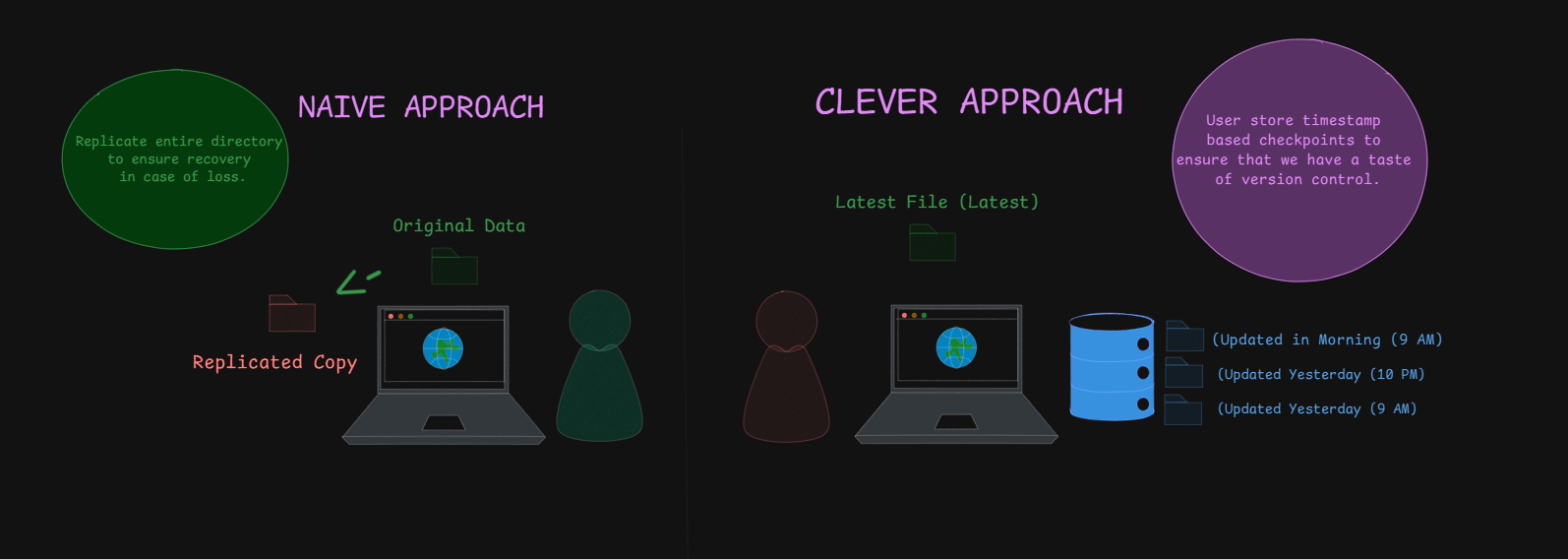
PROBLEMS WITH NAIVE AND CLEVER APPROACHES
- Since the entire file is duplicated every time a change is made, this approach consumes a large amount of storage space.
- Manually identifying changes across multiple versions is tedious, inefficient, and error-prone.
- Keeping track of updates using timestamps does not prevent accidental overwrites or loss of important changes.
SOLUTION
To overcome these issues, **Version Control Systems (VCS)** were introduced. A VCS is a system that saves data at different checkpoints, allowing users to retrieve previous versions in case of accidental modifications or deletions. It also enables reverting to a stable state if compatibility issues arise and helps track changes over time.
LOCAL VERSION CONTROL SYSTEM (VCS)
To improve upon manual versioning, programmers created a **Local Version Control System**, where a database keeps track of all changes made to a file under revision control.
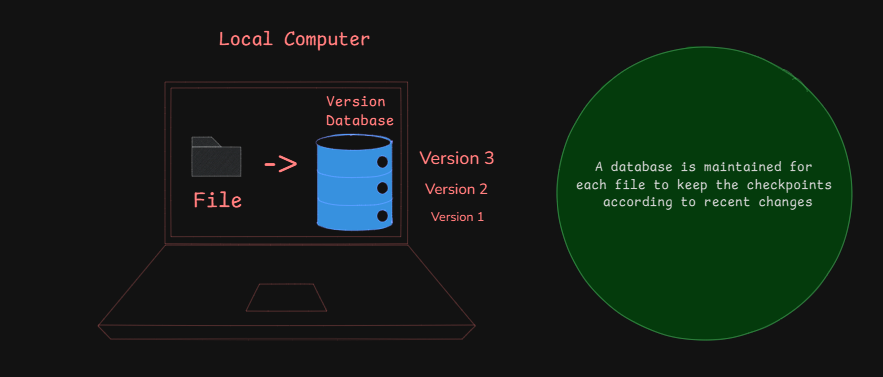
This approach addresses several issues:
- Maintains an ordered history of recent modifications.
- Each file has its own version-controlled database.
- Reduces storage consumption by tracking only changes instead of duplicating entire files.
REVISION CONTROL SYSTEM (RCS)
A **Revision Control System (RCS)** was introduced to further optimize storage by storing **only the differences** (patches) between versions instead of full copies of each file. This approach is **more efficient** since we no longer need to save entire files for every change.
To reconstruct any version of a file, RCS starts from the **base version** and applies all patch sets sequentially to rebuild the desired version.
Example:
**Base Version:** `"Hello World"`
**Patch 1:** `+!` → `"Hello World!"`
**Patch 2:** `+ Welcome` → `"Hello World! Welcome"`
If we want to retrieve **Version 1**, RCS starts from the base version and applies patches sequentially **until Patch 1** is reached:
Base Version + Patch 1: `"Hello World"` + `"!"` = `"Hello World!"`
PROBLEMS WITH LOCAL VCS
While local VCS solves some issues, it introduces new limitations:
- **No Collaboration:** Local VCS is limited to a single system, meaning multiple developers cannot work on the same project collaboratively.
- **No Remote Backup:** If the local machine crashes or data is lost, all version history is lost as well.
- **Limited Change Tracking:** Although RCS tracks changes efficiently, it does not support branching, merging, or distributed development.
CENTRALIZED VERSION CONTROL SYSTEMS (CVCS's)
In a **Local VCS**, users cannot collaborate efficiently because each developer maintains their own **individual version control database**. This makes it difficult for others to contribute, track progress, or understand ongoing changes. Additionally, managing updates requires **direct communication** between developers, making collaboration inefficient.
To solve these issues, **Centralized Version Control Systems (CVCSs)** were introduced. In a **CVCS**, all versioned files are stored in a **centralized database**, allowing multiple developers to:
Work collaboratively on the same project. Track changes made by other team members. Avoid conflicts and ensure smoother project management.This architecture also gives administrators **greater control** over the workflow. Since all changes go through a central server, admins can **review modifications, approve or discard changes, and maintain a clear history of the project's development**. This makes **CVCSs more structured and manageable** compared to **Local VCS**.
PROBLEM WITH CVCS'S
While **Centralized Version Control Systems (CVCSs)** solve the collaboration issues of Local VCS, they come with their own challenges. The biggest drawback is the **Single Point of Failure**, meaning:
- If the **centralized server goes down**, no one can make changes or access version history until it is restored.
- If the **central database is corrupted or lost**, the entire project history and data could be permanently lost—**unless proper backups are maintained**.
These limitations led to the development of **Distributed Version Control Systems (DVCSs)**, which address the risks associated with centralization.
DISTRIBUTED VERSION CONTROL SYSTEM (DVCS's)
**Distributed Version Control Systems (DVCSs)** introduce a **game-changing approach** where every client has a **complete replica of the repository**, including its entire history. Unlike **Centralized VCS**, DVCS does **not depend solely on a central server** to function.
Even if the central server crashes or goes offline, developers can **continue working locally**. Once the server is back online, their changes can be synchronized, ensuring **no data is lost** and **collaboration remains seamless**.
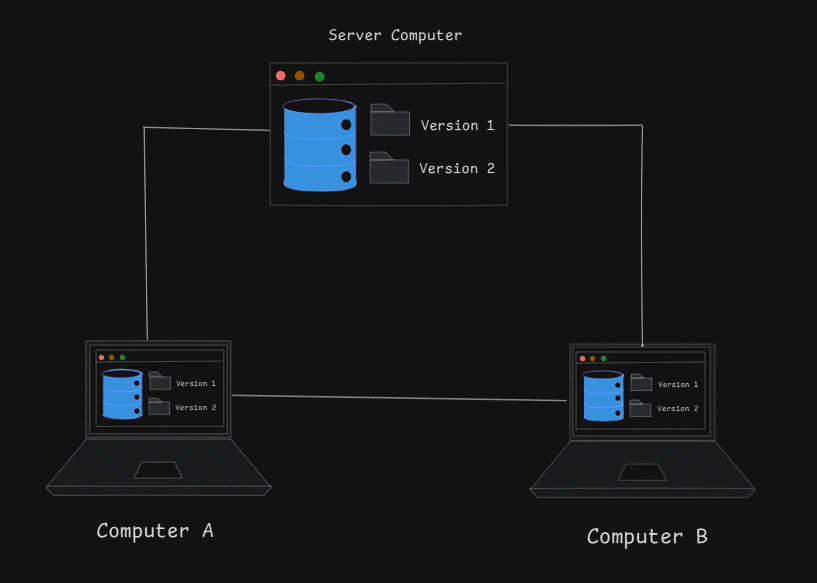 Example : Git, Mercurial.
WHY IS GIT SPECIAL?
Git operates fundamentally differently in terms of data management, setting it apart from other Distributed Version Control Systems (DVCS).
- SNAPSHOT, NOT DIFFERENCES
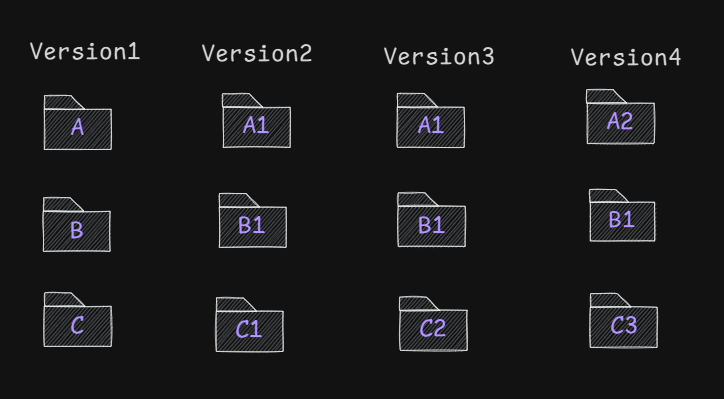
Other DVCSs track changes by capturing patches, storing differences between versions. They treat information as a series of files with incremental modifications over time.
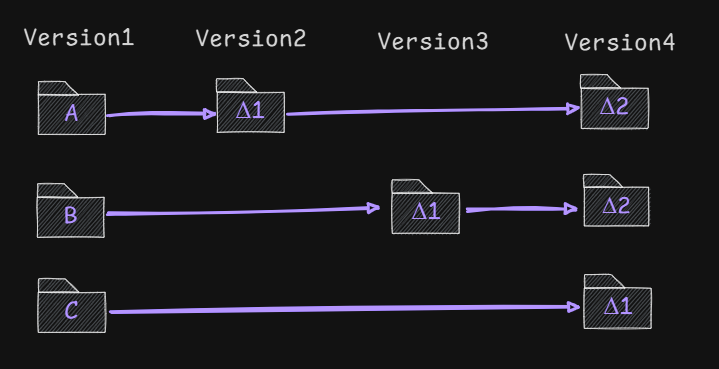
In contrast, Git stores snapshots—essentially miniature file systems. Each commit captures the state of all files at that moment, referencing previous versions efficiently if unchanged. This approach treats data as a sequence of snapshots.
- EVERY OPERATION IS LOCAL
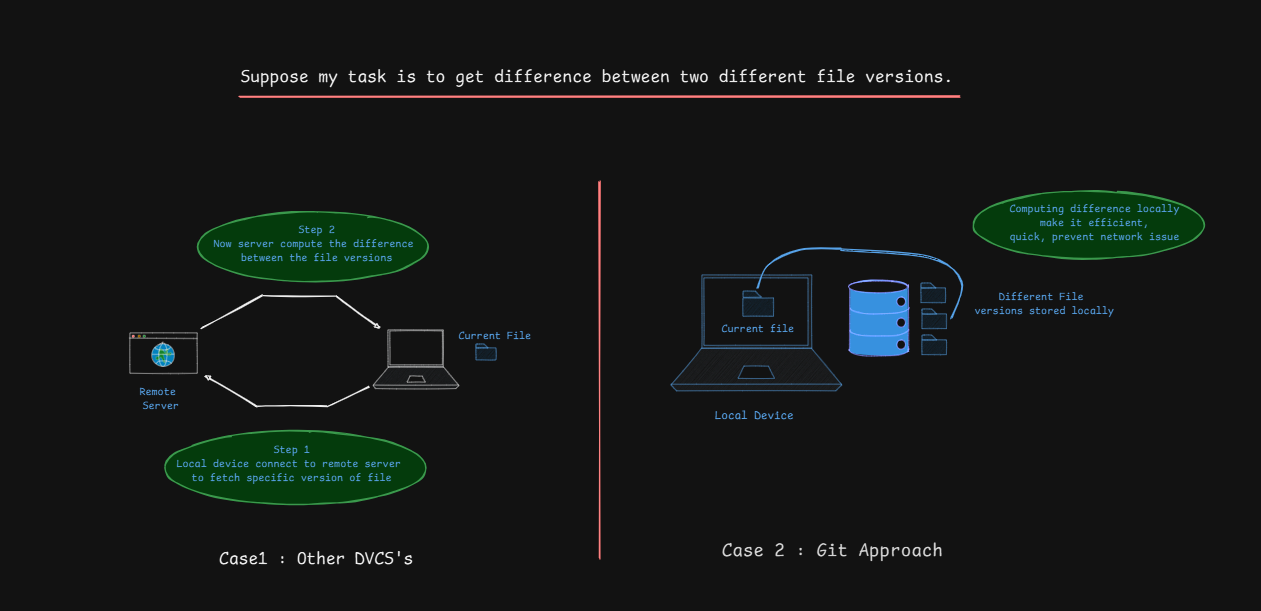
When cloning a repository, Git downloads the entire project history, allowing most operations to be performed locally. This improves speed and enables offline work, with changes synchronized later.
- GIT INTEGRITY
Git ensures integrity by checksumming every file using the SHA-1 algorithm before storing it. This prevents undetected corruption, as each file's content is securely hashed and stored.
- GIT ONLY APPENDS DATA
Git follows an append-only model. Instead of modifying or deleting data, it continuously adds new entries. This guarantees a growing history without overwriting past changes, making it difficult to lose data after a commit.
THE 3 STATES OF A FILE IN GIT
In the Git ecosystem, a file is always in one of the following stages throughout its lifecycle:
MODIFIED
The file has been changed but is not yet recorded in Git's database.
STAGED
The modified file is marked to be included in the next commit.
COMMITTED
The file has been safely stored in Git's database.
THE 3 MAIN SECTIONS OF A GIT PROJECT
A Git project consists of three key sections:
WORKING TREE
Contains the latest pulled data from the remote repository. Changes made here are not yet tracked by Git.
STAGING AREA
Prepares files before committing them. The staging area signals, "I want these changes in my next commit." Files not added here will not be included in the commit.
git add .: This command stages all modified files.
GIT DIRECTORY
The Git directory stores everything, including project history, metadata, and previous versions. It
resides inside the .git folder. When cloning a project, this directory is copied.
GIT WORKFLOW
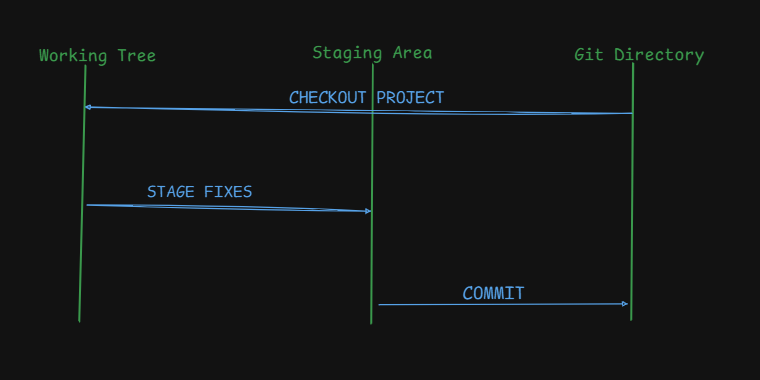
I will modify/update or add new files in my working tree.
I will choose specific files to be in the staging area for the next commit.
The final commit leads to adding a permanent snapshot in the Git directory.